
Hyundai Tucson: Driving assist system / Rear view camera (if equipped)
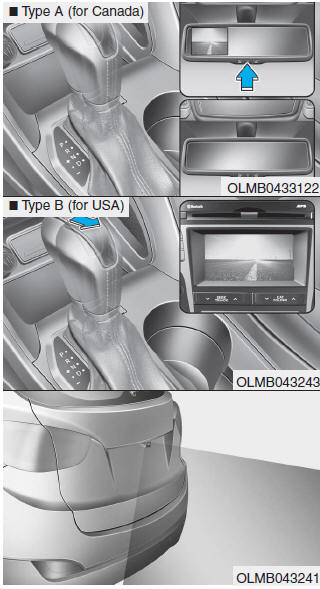
The Rear View Camera will activate when the engine is running and the shift lever is in the R (Reverse) position.
Whenever the vehicle ignition is cycled off and on, the rear view camera will turn on when the shift lever is put into R (Reverse).
â– Type A
The rear view camera can be turned off by pressing the ON/OFF button when the rear view camera is activated.
Press the ON/OFF button once more to turn on the rear view camera when the engine is running and the shift lever is in R (Reverse).
WARNING
- ALWAYS look around your vehicle to make sure there are not any objects or obstacles before moving the vehicle in any direction to prevent a collision.
- Always pay close attention when the vehicle is driven close to objects, particularly pedestrians, and especially children.
- Always keep the camera lens clean. The camera may not work normally if the lens is covered with foreign matter.
 Active ECO system
Active ECO operation
Active ECO helps improve fuel efficiency by controlling the engine and transaxle.
Fuel-efficiency is determined by the driver's driving habits and road conditions.
When t ...

Other information:
Hyundai Tucson (LM) 2010-2015 Service Manual: CVVT Oil Control Valve (OCV) Description and Operation
Description
Continuous Variable Valve Timing (CVVT) system advances or
retards the valve timing of the intake and exhaust valve in accordance
with the ECM control signal which is calculated by the engine speed and
load.
By controlling CVVT, the valve over-lap or under-lap occurs,
which m ...
Hyundai Tucson (LM) 2010-2015 Owners Manual: Important safety precautions
You will find many safety precautions and recommendations throughout this section,
and throughout this manual. The safety precautions in this section are among the
most important.
Always wear your seat belt
A seat belt is your best protection in all types of accidents. Air bags are designed
...
