
Hyundai Tucson: Audio / Audio Remote Control Repair procedures
Hyundai Tucson (LM) 2010-2015 Service Manual / Body Electrical System / Audio / Audio Remote Control Repair procedures
| Inspection |
| 1. |
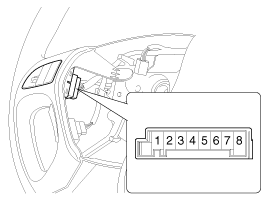
Check for resistance between No.6 and No.7 terminals in each switch position.
[Audio System]
| |||
| 2. |
Check for voltage between No.6 and No.7 terminal in each switch position.
[Audio System]
|
| Removal |
| 1. |
Remove the driver airbag module.
(Refer to the RT group - "Airbag module") |
| 2. |
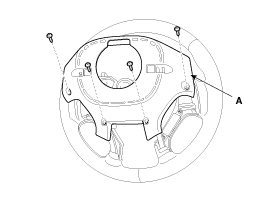
Remove the steering wheel screws from the back cover.
|
| 3. |
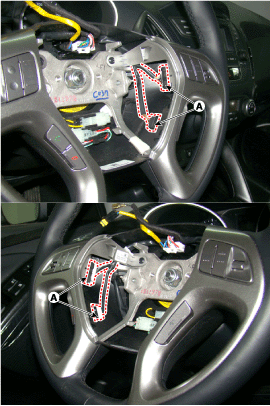
Disconnect the audio remote control switch connector (A).
|
| 4. |
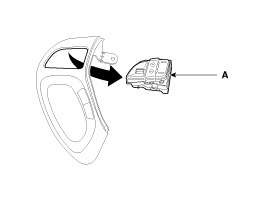
Remove the audio remote control switch (A).
|

| Installation |
| 1. |
Install the audio remote control switch on the steering wheel. |
| 2. |
Install the steering wheel. |
| 3. |
Reconnect the audio remote control switch connector and airbag connectors.
|
| 4. |
Install the driver airbag module.
|
 Audio Remote Control Schematic Diagrams
Circuit Diagram
...
 AUX(Auxiliary) Jack Schematic Diagrams
Circuit Diagram
...
Other information:
Hyundai Tucson (LM) 2010-2015 Owners Manual: Call History
Press the key
Select [Call History]
A list of incoming, outgoing and missed calls is displayed.
Call history may not be saved in the call history list in some mobile phones.
Calls received with hidden caller ID will not be saved in the call history
list.
Calling through the call his ...
Hyundai Tucson (LM) 2010-2015 Owners Manual: Air intake control
The air intake control button is used to select the outside (fresh) air position
or recirculated air position.
To change the air intake control position, push the control button.
Recirculated air position
With the recirculated air position selected, air from the passenger compartment
wi ...
© 2010-2026 www.htmanual.net
