
Hyundai Tucson: Exterior lights / Front fog light (if equipped)
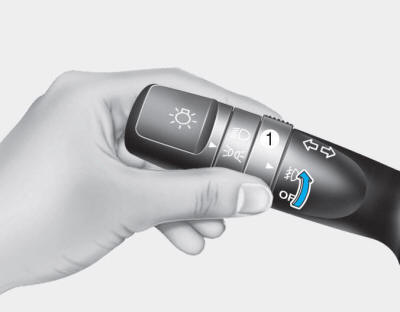
Fog lights are used to provide improved visibility when conditions are poor due to fog, rain, snow, etc.
Use the switch next to the headlight switch to turn the Fog Lights ON and OFF. The fog lights will turn on when fog light switch (1) is turned to ON after the head-lights are turned on.
To turn off the fog lights, turn the switch to OFF.
You can use the fog lights only when the headlights are on low beam.
When the headlight switch is in the AUTO position, you can also use the fog lights when the headlights turn on automatically. The fog lights will go OFF when the headlights turn OFF.
CAUTION
When in operation, the fog lights consume large amounts of vehicle electrical power. Only use the fog lights when visibility is poor.
 Turn signals and lane change signals
To signal a turn, move the lever up for a right turn or down for a left turn
to position (A). The lever will return to the OFF position when the turn is completed.
To signal a lane change, move ...
 Hazard warning flasher
The Hazard Warning Flasher should be used whenever you find it necessary to stop
the car in a hazardous location. When you must make such an emergency stop, always
pull off the road as far as ...
Other information:
Hyundai Tucson (LM) 2010-2015 Service Manual: Description and Operation
Cruise Control
The cruise control system is engaged by the cruise "ON/OFF"
main switch located on right of steering wheel column. The system has
the capability to cruise, coast, accelerate and resume speed.
It also has a safety interrupt, engaged upon depressing brake or shifting select leve ...
Hyundai Tucson (LM) 2010-2015 Owners Manual: Interior care
Interior general precautions
Prevent caustic solutions such as perfume and cosmetic oil, from contacting the
interior parts because they may cause damage or discoloration. If they do contact
the interior parts, wipe them off immediately. See the instructions for the proper
way to clean vinyl. ...
