
Hyundai Tucson: iPod® Mode / iPod® Mode Menu
Within this mode, you will have access to the Random(Shuffle), Repeat and List features.
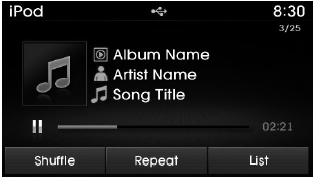
Random(Shuffle)
Press the  button to play
songs in random(Shuffle) order.
button to play
songs in random(Shuffle) order.
Each time the button is pressed, the feature changes in order of Random(Shuffle) Album➟Random (Shuffle) All➟Off.
- Random(Shuffle) Album : Shuffle Album plays album in Random(Shuffle) order.
- Random(Shuffle) All : Plays all songs in Random(Shuffle) order.
Repeat
Press the  button to repeat
the current song. Press the button again to turn the repeat feature off.
button to repeat
the current song. Press the button again to turn the repeat feature off.
Repeat : Repeats the current song
List
Press the  button to display
the Category Menu.
button to display
the Category Menu.
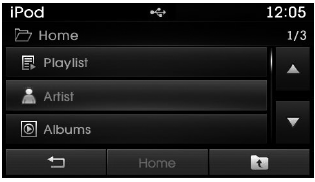
Turn the  TUNE knob left/right to
search for the desired category.
TUNE knob left/right to
search for the desired category.
Once you find the desired category, press the
 TUNE knob to select and play.
 Using iPod® Mode
Playing/Pausing iPod® Songs
Once an iPod® is connected, the mode will automatically start and begin playing
an iPod® song.
While playing, press the button
to pause and press button to pla ...
 Aux mode
...
Other information:
Hyundai Tucson (LM) 2010-2015 Service Manual: Smart Parking Assist System Sensor Repair procedures
Removal
Front SPAS sensor
1.
Remove the front bumper.
(Refer to the BD group - "Front bumper")
2.
Pull out the SPAS sensor (A) by opening the sensor holder out.
3.
Disconnect the connector form the sensor.
Rear SPAS sensor
1.
Lift the vehicle up by using Remove the front bumper.
...
Hyundai Tucson (LM) 2010-2015 Service Manual: Yaw-rate and G Sensor Repair procedures
Removal
1.
Turn ignition switch OFF and disconnect the negative (-) battery cable.
2.
Remove the floor console.
3.
Disconnect the yaw rate & lateral & Longitudinal G sensor connector (A).
4.
Remove the mounting bolts (B).
Tightening torque:
7.9 ~ 10.8 N.m (0.8 ~ 1.1 kgf.m ...
