
Hyundai Tucson: Exterior lights / Lighting control
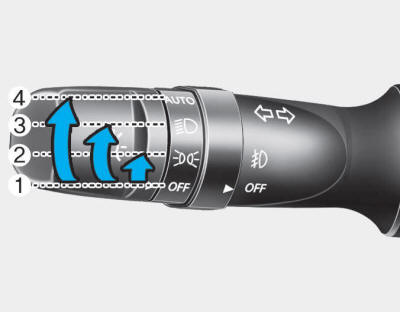
To operate the lights, turn the knob at the end of the control lever to one of the following positions:
(1) OFF Position
(2) Parking Light Position
(3) Headlight Position
(4) AUTO Light Position (if equipped)
Parking light position (  )
)
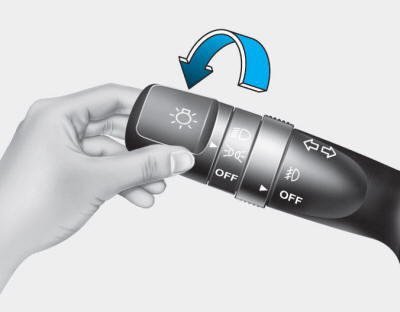
When the light switch is in the parking light position, the parking (position) lights, license plate lights, and instrument panel lights are turned ON.
Headlight position ( )
)
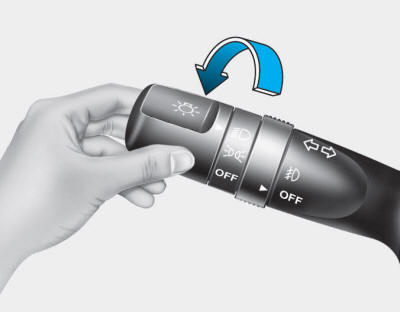
When the light switch is in the headlight position, the headlights, parking (position) lights, license plate lights, and instrument panel lights are turned ON.
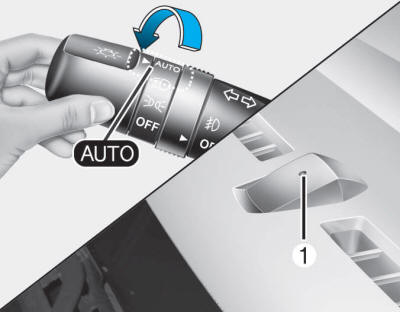
AUTO light position
When the light switch is in the AUTO position, the parking lights and the headlights will be turned ON or OFF automatically depending on the amount of light outside the vehicle.
Even with the AUTO Light feature in operation, it is recommended to manually turn ON the lights when driving at night or in a fog, or when you enter dark areas, such as tunnels and parking facilities.
CAUTION
- Do not cover or spill anything on the sensor (1) located on the instrument panel.
- Do not clean the sensor using a window cleaner. The cleaner may leave a light film which could interfere with sensor operation.
- If your vehicle has window tint or other types of metallic coating on the front windshield, the AUTO light system may not work properly.
 Exterior lights
...
 Daytime Running Light (DRL)
Daytime Running Lights (DRL) can make it easier for others to see the front of
your vehicle during the day, especially after dawn and before sunset.
The DRL will turn off when:
The headlight sw ...
Other information:
Hyundai Tucson (LM) 2010-2015 Owners Manual: 30,000 miles (48,000 km) or 24 months
Rotating tires
Inspect vacuum hose
Inspect air conditioning refrigerant
Inspect brake hoses and lines
Inspect drive shafts and boots
Inspect exhaust pipe and muffler
Inspect front brake disc/pads, calipers
Inspect propeller shaft (AWD)
Inspect rear brake disc/pads
Inspect steeri ...
Hyundai Tucson (LM) 2010-2015 Service Manual: Repair procedures
Removal
1.
Remove the liftgate trim in the trunk after removing the screws and clips.
(Refer to the BD group - "Liftgate")
2.
Remove the liftgate garnish (A) after disconnecting the connector and removing the nuts.
3.
Remove the back view camera (A) after loosening the screws (2EA).
...
