
Hyundai Tucson: Accessing your vehicle / Remote key
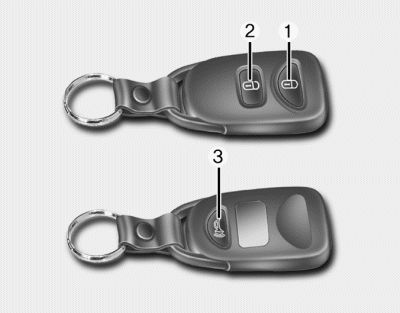
Your HYUNDAI uses a remote key, which you can use to lock or unlock a door (and tailgate) and even start the engine.
1. Door Lock
2. Door Unlock
3. Panic
Locking
To lock :
1. Close all doors, engine hood and tailgate.
2. Press the Door Lock button (1) on the remote key.
3. The hazard warning lights will blink and the chime will sound once if the lock button is pressed once more within four seconds.
4. Make sure the doors are locked by checking the position of the door lock button inside the vehicle.
WARNING
Do not leave the keys in your vehicle with unsupervised children. Unattended children could place the key in the ignition switch and may operate power windows or other controls, or even make the vehicle move, which could result in serious injury or death.
Unlocking
To unlock:
1. Press the Door Unlock button (2) on the remote key.
3. The driver’s door will unlock. The hazard warning lights will blink two times.
✽ NOTICE
- If you press the Door Unlock button again within four seconds, then all the doors will unlock.
- After unlocking the doors, the doors will lock automatically after 30 seconds unless a door is opened.
- You can change the system to the central door unlock mode (unlock all the doors when you press the unlock button one time). If you want this feature, perform the following:
Unlock mode conversion (two stage unlock mode ↔central door unlock mode)
The unlock mode changes alternately by pressing the lock button and unlock button on the remote key at the same time for 4 seconds or more. The hazard warning lights will blink four times to indicate that the mode conversion is completed.
Panic button
Press the Panic button (4) for more than one second. The horn sounds and hazard warning lights flash for about 30 seconds.
To cancel the panic mode, press any button on the remote key.
CAUTION
To prevent damaging the remote key:
- Keep the remote key away from water or any liquid. If the remote key is inoperative due to exposure to water or other liquids, it will not be covered by your manufacturer’s vehicle warranty.
- Avoid dropping or throwing the remote key.
- Protect the remote key from extreme temperatures.
Mechanical key
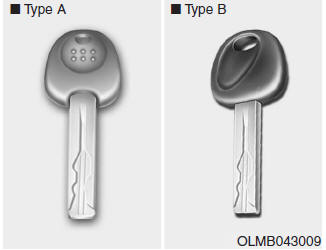
If the remote key does not operate normally, you can lock or unlock the door by using the mechanical key.

 Remote key precautions
The remote key will not work if any of the following occur:
The key is in the ignition switch.
You exceed the operating distance limit (about 30 m [90 feet]).
The remote key battery is weak.
...
Other information:
Hyundai Tucson (LM) 2010-2015 Service Manual: Repair procedures
Inspection
1.
Disconnect the ignition switch connector (B) and key warning switch connector (A) from under the steering column.
2.
Check for continuity between the terminals.
3.
If continuity is not specified, replace the switch.
Removal
1.
Disconnect the negative (-) battery termin ...
Hyundai Tucson (LM) 2010-2015 Service Manual: General Information
General Troubleshooting Information
Before Troubleshooting
1.
Check applicable fuses in the appropriate fuse/relay box.
2.
Using the battery checker (MCR-570 KIT), check the battery for damage, state of charge, and clean and tight connections.
(Refer to the EE group - "Battery")
&nbs ...
