
Hyundai Tucson: Back View Camera System / Repair procedures
| Removal |
| 1. |
Remove the liftgate trim in the trunk after removing the screws and clips.
(Refer to the BD group - "Liftgate") |
| 2. |
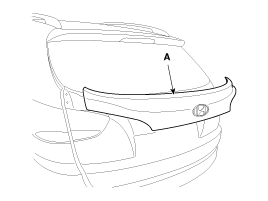
Remove the liftgate garnish (A) after disconnecting the connector and removing the nuts.
|
| 3. |
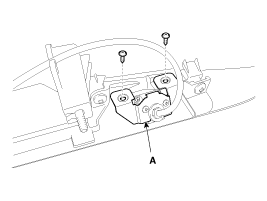
Remove the back view camera (A) after loosening the screws (2EA).
|
| 4. |
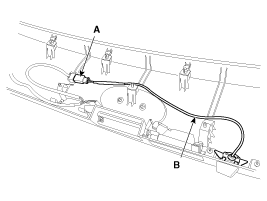
Disconnect the connector (A), and then remove the back view camera module (B).
|
| Installation |
| 1. |
Install the back view camera. |
| 2. |
Install the liftgate garnish and trim. |
 Description and Operation
Description
Back view camera will activate when the backup light is ON with the ignition switch ON and the shift lever in the R position.
This system is a supplemental system that shows behind the ...

Other information:
Hyundai Tucson (LM) 2010-2015 Service Manual: Brake Booster Repair procedures
Brake Booster Operating Test
For simple checking of the brake booster operation, carry out the following tests.
1.
Run the engine for one or two minutes, and then stop it. If
the pedal depresses fully the first time but gradually becomes higher
when depressed succeeding times, the booster ...
Hyundai Tucson (LM) 2010-2015 Owners Manual: Battery saver function
The purpose of this feature is to prevent the battery from being discharged.
The system automatically turns off the parking lights when the engine is turned
off and the driverside door is opened (in that order).
With this feature, the parking lights will be turned off automatically if the
driv ...
