
Hyundai Tucson: MY Music mode / Basic Mode Screen
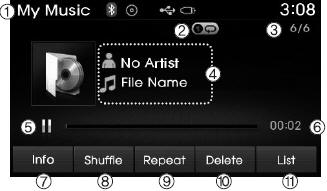
1. Mode Displays currently operating mode.
2. Operation State From Repeat/Random(Shuffle)/ Scan, displays the currently operating function.
3. File Index Displays the current file/total number of files.
4. File Info Displays information about the current file.
5. Play/Pause Changes the play/pause state.
6. Play Time Displays the current play time.
7. Info Displays detailed information for the current file.
8. Random(Shuffle) Turns the Random(Shuffle) feature on/off.
9. Repeat Turns the Repeat feature on/off.
10. Delete Deletes the current file.
11. List Moves to the list screen.
 MY Music mode
...
 Using My Music Mode
Playing/Pausing My Music Files
While playing, press the
button to pause and press button to
play.
✽ NOTICE
If there are no files saved within My Music, the [My Music] button will be ...
Other information:
Hyundai Tucson (LM) 2010-2015 Service Manual: Front Stabilizer Bar Repair procedures
Replacement
1.
Remove the front wheel & tire.
Tightening torque :
88.3 ~ 107.9 N.m(9.0 ~ 11.0 kgf.m, 65.1 ~ 79.6 lb-ft)
Be careful not to damage to the hub bolts when removing the front wheel & tire.
2.
Disconnect the stabilizer link (B) with the front ...
Hyundai Tucson (LM) 2010-2015 Owners Manual: Tire sidewall labeling
This information identifies and describes the fundamental characteristics
of the tire and also provides the tire identification number (TIN) for safety standard
certification. The TIN can be used to identify the tire in case of a recall.
1. Manufacturer or brand name
Manufacturer or brand na ...
