
Hyundai Tucson: Interior / Console Repair procedures
Hyundai Tucson (LM) 2010-2015 Service Manual / Body (Interior and Exterior) / Interior / Console Repair procedures
| Replacement |
| [M/T] |
|

|

| 1. |
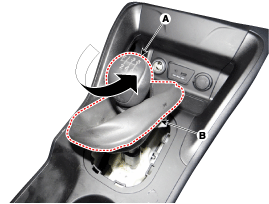
Using a screwdriver, remove the knob (A) and boots (B).
|
| 2. |
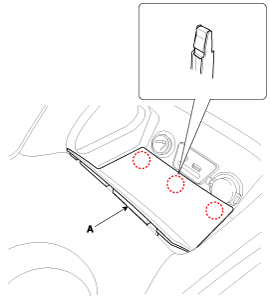
Using a screwdriver, remove the floor console tray (A).
|
| 3. |
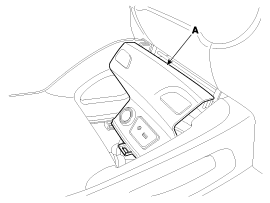
Using a screwdriver, remove the floor console bezel (A).
|
| 4. |
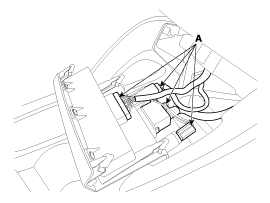
Disconnect the connectors (A).
|
| 5. |
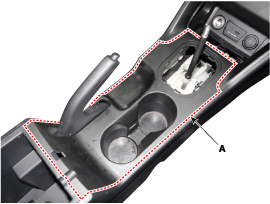
Using a screwdriver, remove the console upper cover (A).
|
| 6. |
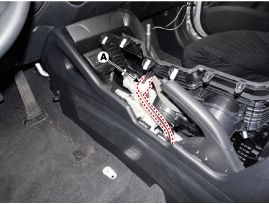
Disconnect the connector (A).
|
| 7. |
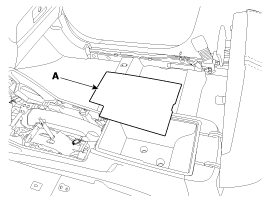
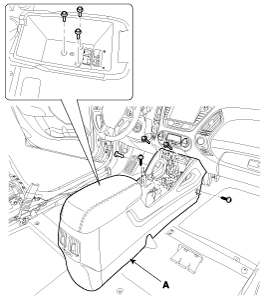
Remove the console tray mat (A).
|
| 8. |
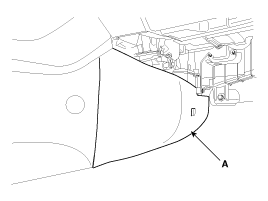
Remove the extension side cover (A).
|
| 9. |
After loosening the mounting bolts and screws, then remove the floor console assembly (A).
|
| [A/T] |
|
|
| 1. |
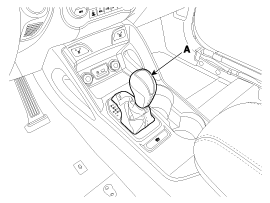
Remove the knob (A).
|
| 2. |
Using a screwdriver, remove the floor console tray (A).
|
| 3. |
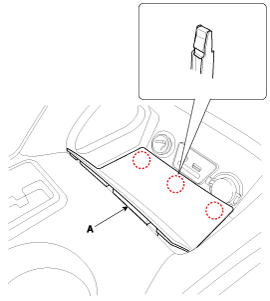
Using a screwdriver, remove the floor console bezel (A).
|
| 4. |
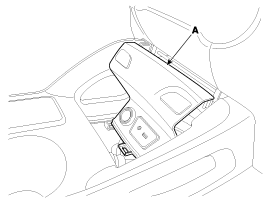
Disconnect the connectors (A).
|
| 5. |
Using a screwdriver, remove the console upper cover (A).
|
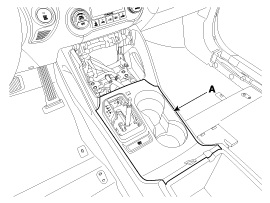
| 6. |
Disconnect the connector (A).
|
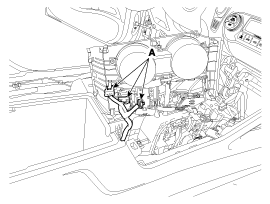
| 7. |
Remove the console armrest tray (A).
|
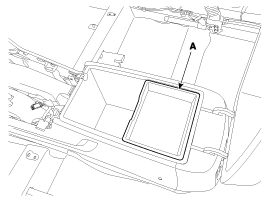
| 8. |
Remove the console tray mat (A).
|
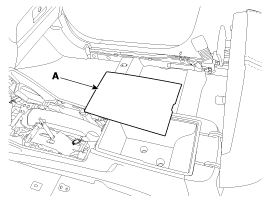
| 9. |
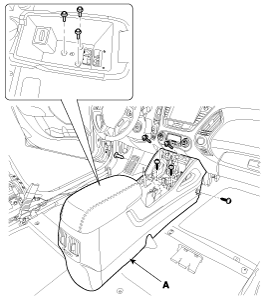
Remove the extension side cover (A).
|
| 10. |
After loosening the mounting bolts and screws, then remove the floor console assembly (A).
|
| 11. |
Install in the reverse order of removal.
|
 Console Components and Components Location
Components
[A/T]
1. Floor console2. Console upper cover (AT)3. Floor console tray4. Floor console bezel5. Extension side cover
...
 Crash Pad Components and Components Location
Components
1. Main crash pad assembly2. Center fascia upper panel3. Cluster fascia panel4. Cluster fascia lower panel5. Crash pad side cover6. Shrouds upper panel 7. Shrouds lower panel 8. Air ve ...
Other information:
Hyundai Tucson (LM) 2010-2015 Owners Manual: Seat belt use during pregnancy
The seat belt should always be used during pregnancy. The best way to protect
your unborn child is to protect yourself by always wearing the seat belt.
Pregnant women should always wear a lap-shoulder seat belt. Place the shoulder
belt across your chest, routed between your breasts and away fro ...
Hyundai Tucson (LM) 2010-2015 Service Manual: Specifications
Specifications
ItemSpecificationTypeElectric Power Steering SystemSteering gearTypeRack & PinionRack stroke153mm (6.02 in.) ± 1 (0.3937 in)Steering angle(Max.)Inner39.4°±1.30`Outer31.9°
Tightening Torques
ItemTightening torque (kgf.m)NmKgf.mlb-ftHub nuts88.3 ~ 107.99.0 ~ 11.065.1 ...
© 2010-2026 www.htmanual.net
