
Hyundai Tucson: Hands Free System / Hands Free Switch Repair procedures
Hyundai Tucson (LM) 2010-2015 Service Manual / Body Electrical System / Hands Free System / Hands Free Switch Repair procedures
| Inspection |
| 1. |
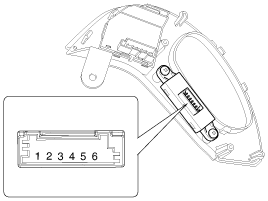
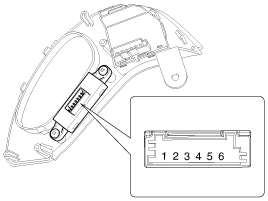
Check the handsfree remote control switch for resistance between No.4 and No.5 terminals in each switch position.
[Call + Hang Up]
[Voice]
[Call + Hang Up]
[Voice]
|
| Removal |
| 1. |
Remove the driver airbag module.
(Refer to the RT group - "Airbag module") |
| 2. |
Remove the steering wheel.
(Refer to the ST group - "Steering column and shaft") |
| 3. |
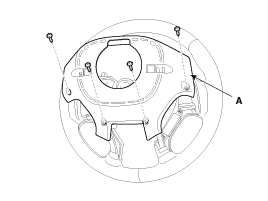
Remove the steering wheel rear cover (A) after loosening the screws.
|
| 4. |
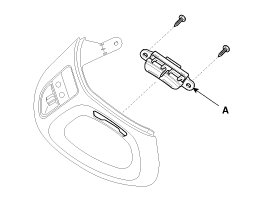
Remove the handsfree remote switch (A) after loosening the screws.
|
| Installation |
| 1. |
Install the handsfree remote switch to the steering wheel bezel. |
| 2. |
Install the steering wheel and bezel. |
| 3. |
Reconnect the handsfree remote control switch connector and airbag connectors.
|

| 4. |
Install the driver airbag module. |
 Hands Free Switch Components and Components Location
Component Location
...
 Hands Free Mic Repair procedures
Inspection
1.
Disconnect the negative(-) battery terminal.
2.
Remove the roof trim.
(Refer to the BD group - "Roof trim")
3.
Remove the hands free mic (A) after loosening the connector an ...
Other information:
Hyundai Tucson (LM) 2010-2015 Service Manual: Heated Oxygen Sensor (HO2S) Schematic Diagrams
Circuit Diagram
(M/T)
(A/T)
...
Hyundai Tucson (LM) 2010-2015 Service Manual: Receiver-Drier Repair procedures
Replacement
1.
Remove the condenser, and then remove the bottom cap (B) with L wrench (A) from the condenser.
Tightening torque :
20 ~ 25 N.m (2.0 ~ 2.5 kgf.m, 14.5 ~ 18.2 lb-ft)
2.
Remove the desiccant (A) from condenser using a long nose plier. Check for crumbled desiccant and cl ...
© 2010-2026 www.htmanual.net
