
Hyundai Tucson: Exterior / Mirror Repair procedures
Hyundai Tucson (LM) 2010-2015 Service Manual / Body (Interior and Exterior) / Exterior / Mirror Repair procedures
| Replacement |
Outside Rear View Mirror Assembly Replacement
|

| 1. |
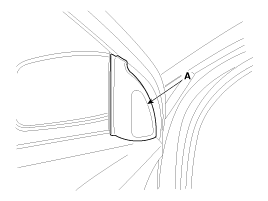
Using a screwdriver, remove the quadrant inner cover (A).
|
| 2. |
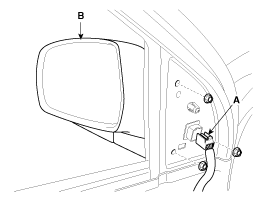
After disconnecting the connector (A), then remove the outside rear view mirror (B).
|
| 3. |
Install in the reverse order of removal. |
Inside Rear View Mirror Assembly Replacement
| Mirror Replacement |
| 1. |
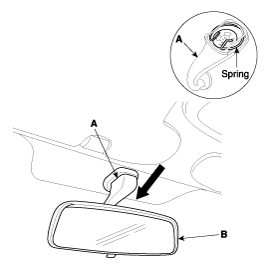
Push the inside rear view mirror base (A) down to remove the inside rear view mirror assembly (B).
|
| 2. |
Install in the reverse order of removal. |
| ECM Mirror Replacement |
| 1. |
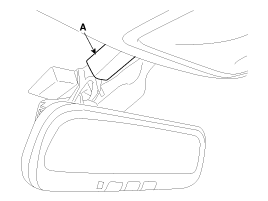
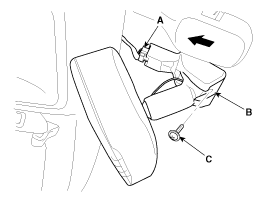
Using a screwdriver, then remove the ECM mirror cover (A).
|
| 2. |
Disconnect the connector (A). |
| 3. |
Loosen the mounting screw (C), push the ECM mirror base UP to remove the ECM mirror assembly (B).
|
| 4. |
Install in the reverse order of removal. |
 Panoramaroof Repair procedures
Replacement
Glass Replacement
1.
Open the glass.
2.
Loosen the mounting screw (A).
3.
After loosening the mounting screws, then remove the glass (A).
•
Do not ...
 Cowl Top Cover Repair procedures
Replacement
1.
Remove the cover and nut, then remove the wiper arm (A).
2.
Detach the clips, then remove the cowl top cover (B).
3.
Install in the reverse order of removal.
& ...
Other information:
Hyundai Tucson (LM) 2010-2015 Service Manual: Specifications
Specifications
ItemsSpecificationsRated voltage5VLoadMax. 1mADetection illuminationsTail lampON : 1.0 ± 0.10 (V)OFF : 2.3 ± 0.20 (V)Head lampON : 1.0 ± 0.10 (V)OFF : 2.3 ± 0.20 (V)
...
Hyundai Tucson (LM) 2010-2015 Service Manual: Description and Operation
Description
The immobilizer system will disable the vehicle unless the
proper ignition key is used, in addition to the currently available
anti-theft systems such as car alarms, the immobilizer system aims to
drastically reduce the rate of auto theft.
1.
Encrypted SMARTRA type immobilizer ...
© 2010-2026 www.htmanual.net
