
Hyundai Tucson: Operating door locks from outside the vehicle / Remote key
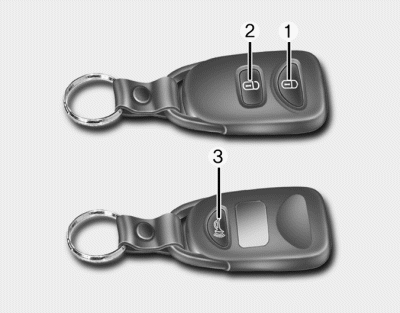
To lock the doors, press the Door Lock button (1) on the remote key.
Press the Door Unlock button (2) on the remote key, the driver’s door will unlock. If you press the Door Unlock button on the remote key again within four seconds, then all the doors will unlock.
Once the doors are unlocked, they may be opened by pulling the door handle.
When closing the door, push the door by hand. Make sure that doors are closed securely.
✽ NOTICE
You can change the system to the central door unlock mode (unlock all the doors when you press the unlock button one time). If you want this feature, perform the following: Unlock mode conversion (two stage unlock mode ↔ central door unlock mode)
The unlock mode changes alternately by pressing the lock button and unlock button on the remote key at the same time for 4 seconds or more. The hazard warning lights will blink four times to indicate that the mode conversion is completed
✽ NOTICE
- In cold and wet climates, door lock and door mechanisms may not work properly due to freezing conditions.
- If the door is locked/unlocked multiple times in rapid succession with either the vehicle key or door lock switch, the system may stop operating temporarily in order to protect the circuit and prevent damage to system components.
 Mechanical key
Turn the key toward the rear of the vehicle to unlock and toward the front of
the vehicle to lock.
If you lock the door with a key, all vehicle doors will lock automatically. From
the driver’ ...
 Smart key
To lock the doors, press the button on the outside door handle while carrying
the smart key with you or press the door lock button on the smart key.
Press the button on the outside door handle wh ...
Other information:
Hyundai Tucson (LM) 2010-2015 Service Manual: Intake Air Temperature Sensor (IATS) Specifications
Specification
TemperatureResistance (kx)°C°F-40-4040.93 ~ 48.35-20-413.89 ~ 16.030325.38 ~ 6.0910503.48 ~ 3.9020682.31 ~ 2.57401041.08 ~ 1.21501221.56 ~ 1.74601400.54 ~ 0.62801760.29 ~ 0.34
...
Hyundai Tucson (LM) 2010-2015 Owners Manual: Front windshield defroster (if equipped)
To activate the front windshield defroster, press the front windshield defroster
button located in the center facia switch panel.
The indicator on the front windshield defroster button illuminates when the deicer
is ON.
The front windshield defroster automatically turns off after approxima ...
