
Hyundai Tucson: Ignition Switch Assembly / Repair procedures
Hyundai Tucson (LM) 2010-2015 Service Manual / Body Electrical System / Ignition Switch Assembly / Repair procedures
| Inspection |
| 1. |
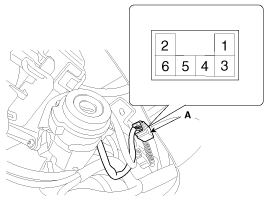
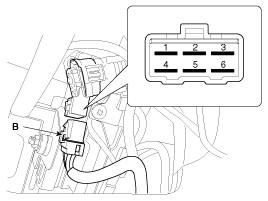
Disconnect the ignition switch connector (B) and key warning switch connector (A) from under the steering column.
|
| 2. |
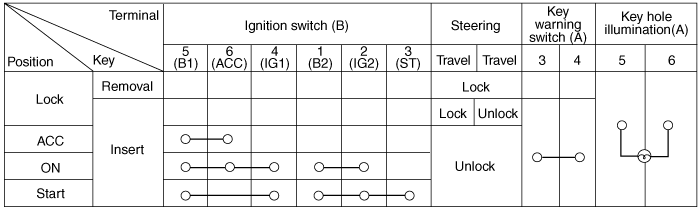
Check for continuity between the terminals. |
| 3. |
If continuity is not specified, replace the switch. |
| Removal |
| 1. |
Disconnect the negative (-) battery terminal. |
| 2. |
Remove the steering column upper and lower shrouds.
(Refer to the ST group - "Steering column") |
| 3. |
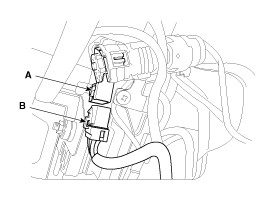
Remove the ignition switch (A) after disconnecting the 6P connector (B).
|
| 4. |
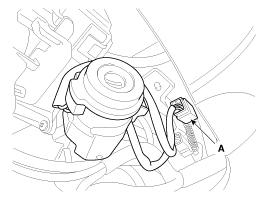
Remove the key warning and immobilizer connector (A).
|
| 5. |
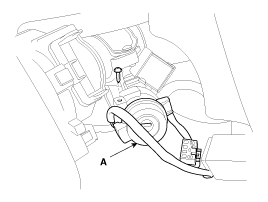
Remove the key illumination lens (A).
|
| 6. |
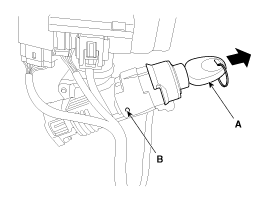
If it is necessary to remove the key lock cylinder (A), remove the key lock cylinder after pushing lock pin (B) with key ACC.
|
| Installation |
| 1. |
Install the key lock cylinder. |
| 2. |
Install the illumination bulb, lens and cover. |
| 3. |
Install the key warning and immobilizer connector. |
| 4. |
Install the ignition switch. |
| 5. |
Install the steering column shrouds and crash pad lower panel. |


Other information:
Hyundai Tucson (LM) 2010-2015 Service Manual: Flow Diagram
Power Flow Chart
P,NUD/BLR/B26/B35R/COD/COWCx
x Direction of Rotation
xLower & Reverse Brake (LR/B) Activation > Overdrive (O/D) Hub Lock > Mid & Rear P/C Lock
xInput Shaft Rotation > Rear Sun Gear Rotation > Rear
Inner Pinion Rotation (Reverse) > Rear Outer Pinion Rotation > R ...
Hyundai Tucson (LM) 2010-2015 Service Manual: Specifications
Specifications
ItemSpecificationTypeElectric Power Steering SystemSteering gearTypeRack & PinionRack stroke153mm (6.02 in.) ± 1 (0.3937 in)Steering angle(Max.)Inner39.4°±1.30`Outer31.9°
Tightening Torques
ItemTightening torque (kgf.m)NmKgf.mlb-ftHub nuts88.3 ~ 107.99.0 ~ 11.065.1 ...
© 2010-2026 www.htmanual.net
