
Hyundai Tucson: Manual heating and air conditioning / Temperature control
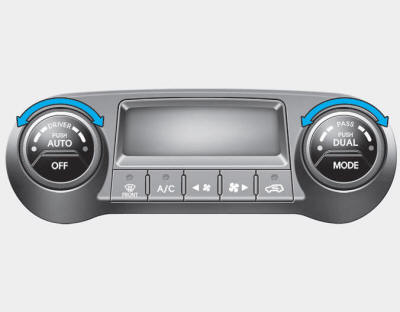
Use the temperature control knob to set the desired temperature in the cabin.
To increase the temperature, rotate the knob clockwise. To decrease the temperature, rotate the knob counterclockwise.
To increase the temperature to the highest temperature setting, rotate the knob clockwise continuously until the climate control display indicates (HI).
To decrease the temperature to the lowest temperature setting, rotate the knob counterclockwise continuously until the climate control display indicates (LO).
When turning the knob, the temperature will increase or decrease by 1°F/0.5°C. When set to the lowest temperature setting, the air conditioning will operate continuously.
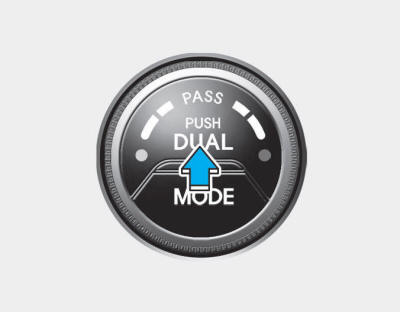
Adjusting the driver and passenger side temperature individually
1. Press the DUAL button to operate the driver and passenger side temperature individually. Also, if the passenger side temperature control switch is operated, it will automatically change to the DUAL mode as well.
2. Operate the left temperature control to adjust the driver side temperature. Operate the right temperature control to adjust the passenger side temperature.
When the driver side temperature is set to the highest (HI) or lowest (LO) temperature setting, the DUAL mode is deactivated for maximum heating or cooling.
Adjusting the driver and passenger side temperature equally
1. Press the DUAL button again to deactivate DUAL mode. The passenger side temperature will be set to the same temperature as the driver side.
2. Operate the driver side temperature control switch. The driver and passenger side temperature will be adjusted equally.
Temperature conversion
You can switch the temperature mode between Fahrenheit to Centigrade as follows:
While pressing the OFF button, press the AUTO button for 3 seconds or more.
The display will change from Fahrenheit to Centigrade, or from Centigrade to Fahrenheit.
If the battery has been discharged or disconnected, the temperature mode display will reset to Fahrenheit.
 Mode selection
The mode selection button controls the direction of the air flow through the
ventilation system.
The air flow outlet port is converted as follows:
Face-Level (B, D)
Air flow is directed t ...
 Outside thermometer
The current outside temperature is displayed in 1°F (1°C) increments. The temperature
range is between - 40°F ~ 140°F (-40°C ~ 60°C).
The outside temperature on the display may not change ...
Other information:
Hyundai Tucson (LM) 2010-2015 Service Manual: Alternator Schematic Diagrams
Circuit Diagram
•
COM signal - When
controlling the voltage generated, the ECM sends the target voltage data
to the alternator via a PWM signal.(High voltage: 4V or higher, low
voltage: 2V or lower)
•
FR signal - The
transistor activation signal inside t ...
Hyundai Tucson (LM) 2010-2015 Owners Manual: Low tire pressure indicator
The low tire pressure indicator comes on for 3 seconds after the ignition switch
is turned to the "ON" position.
The low tire pressure indicator illuminates when one or more of your tires is
significantly underinflated.
The low tire pressure indicator will illuminate after it blinks for appr ...
