
Hyundai Tucson: Automatic climate control system / Manual heating and air conditioning
The heating and cooling system can be controlled manually by pushing buttons or turning knob(s) other than the AUTO button. In this case, the system works sequentially according to the order of buttons or knob(s) selected.
✽ NOTICE
When pressing any button (or turning any knob) except the AUTO button while using automatic operation, the functions not selected will continue to be controlled automatically.
1. Start the engine.
2. Set the mode to the desired position.
To improve the effectiveness of heating and cooling;
- Heating: 
- Cooling: 
3. Set the temperature control to the desired position.
4. Set the air intake control to the outside (fresh) air position.
5. Set the fan speed control to the desired speed.
6. If air conditioning is desired, turn the air conditioning system on.
Press the AUTO button in order to convert to full automatic control of the system.
 Automatic heating and air conditioning
When using the AUTO climate control mode, the fan speeds, mode selection, air
intake control, and the air conditioning will be automatically controlled according
to the desired temperature set ...
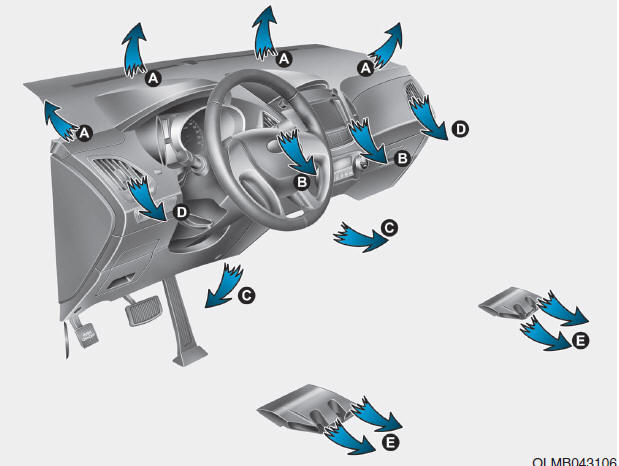
 Mode selection
The mode selection button controls the direction of the air flow through the
ventilation system.
The air flow outlet port is converted as follows:
Face-Level (B, D)
Air flow is directed t ...
Other information:
Hyundai Tucson (LM) 2010-2015 Owners Manual: What to expect after an air bag inflates
After a frontal or side air bag inflates, it will deflate very quickly. Air bag
inflation will not prevent the driver from seeing out of the windshield or being
able to steer. Curtain air bags may remain partially inflated for some time after
they deploy.
WARNING
After an air bag inflates, t ...
Hyundai Tucson (LM) 2010-2015 Service Manual: Multimedia Jack Description and Operation
Description
The multimedia jack on the console upper cover is for
customers who like to listen to external portable music players like the
MP3, iPod and etc., through the vehicle's sound system when it is
linked to this jack. The customer has this added option.
In case of distortions from ...
