
Hyundai Tucson: Driveshaft Assembly / TJ Joint Repair procedures
| Removal |
|

| 1. |
Remove the Front Driveshaft.
(Refer to Driveshaft Assembly - “Front Driveshaft�) |
| 2. |
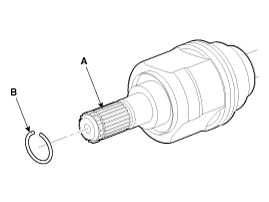
Remove the housing circlip (B) from the driveshaft spline (A).
|
| 3. |
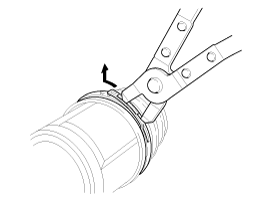
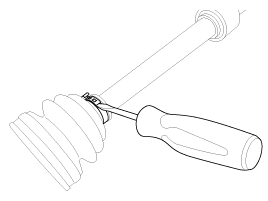
Remove both boot bands from the TJ housing.
|
| 4. |
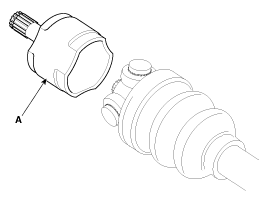
Remove the TJ housing (A).
|
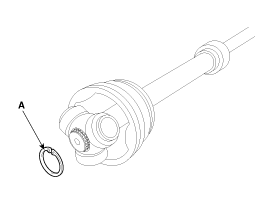
| 5. |
Remove the retainer ring (A) from the shaft.
|
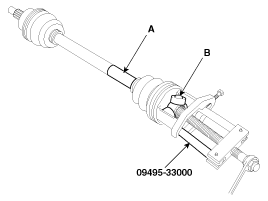
| 6. |
Remove the spider assembly (B) from the driveshaft (A) using the special tool (09495-33000).
|
| 7. |
Clean the spider assembly. |
| 8. |
Remove the TJ boot (A).
|
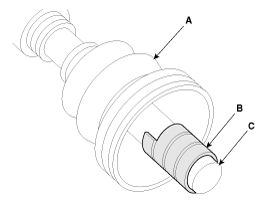
| Inspection |
| 1. |
Check the spider assembly for roller rotation, wear or corrosion. |
| 2. |
Check the groove inside the joint case for wear or corrosion |
| 3. |
Check the TJ boots for damage and deterioration. |
| Installation |
| 1. |
Wrap tape around the driveshaft spline(TJ) to prevent damage to the boot. |
| 2. |
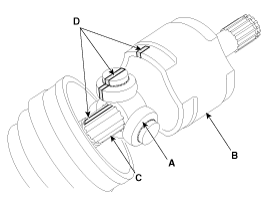
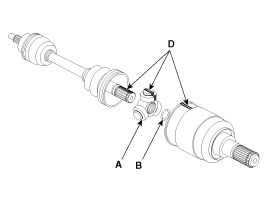
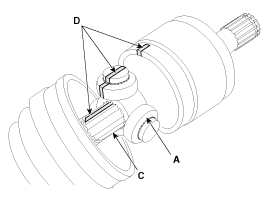
Using the alignment marks (D) made during disassembly as a
guide, install the spider assembly (A) and retainer ring (B) on the
driveshaft splines (C).
|
| 3. |
Add specified grease to the joint boot as much as it was wiped away at inspection. |
| 4. |
Install the both boot band. |
| 5. |
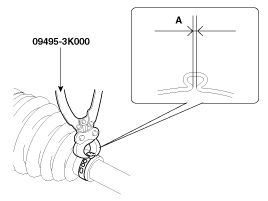
Using the SST(09495-3K000), secure the TJ boot bands.
|
| 6. |
Install the front driveshaft.
(Refer to Driveshaft Assembly - “Front Driveshaft�) |
| 7. |
Check the front alignment.
(Refer to Suspension System - "Front Alignment") |
 TJ Joint Components and Components Location
Components
[LH]
1. BJ assembly 2. BJ circlip 3. BJ boot band 4. BJ boot 5. Shaft6. TJ boot band7. TJ boot8. Spider assembly9. Retainer ring10. TJ housing11. Housing circlip
[RH]
1. BJ ...
 Dynamic Damper Components and Components Location
Components
1. BJ assembly2. BJ circlip3. BJ boot band4. BJ boot5. Dynamic damper band6. Dynamic damper7. Shaft8. TJ boot band9. TJ boot10. Spider assembly11. Retainer ring12. TJ housing13. Housin ...
Other information:
Hyundai Tucson (LM) 2010-2015 Owners Manual: Using Voice Recognition
Starting Voice Recognition
Shortly press the key on
the steering wheel remote controller Say a command.
If prompt feedback is in [ON], then the system will say “Please say a command
after the beep (BEEP)�
If prompt feedback is in [OFF] mode, then the system will only say “(B ...
Hyundai Tucson (LM) 2010-2015 Owners Manual: Cargo security screen (if equipped)
Use the cargo security screen to hide items stored in the cargo area.
To use the cargo security screen:
1. Pull the cargo security screen towards the rear of the vehicle by the handle.
2. Insert the guide pin into the guide.
When the cargo security screen is not in use:
1. Pull the carg ...
