
Hyundai Tucson: Using Bluetooth® Wireless Technology / Contacts
Press the  key
key
 Select [Contacts]
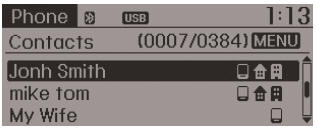
The list of saved phone book entries is displayed.
NOTE:
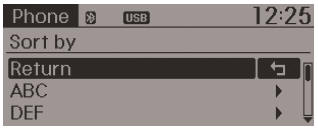
Find a contact in an alphabetical order, press the
 key.
key.
✽ NOTICE
- Up to 1,000 contacts saved in your Bluetooth® Wireless Technology phone can be downloaded into the car contacts. Contacts that have been downloaded to the car cannot be edited or deleted on the phone.
- Mobile phone contacts are managed separately for each paired Bluetooth® Wireless Technology device (max 5 devices x 1,000 contacts each). Previously downloaded data is maintained even if the Bluetooth® Wireless Technology device has been disconnected. (However, the contacts and call history saved to the phone will be deleted if a paired phone is deleted.)
- It is possible to download contacts during Bluetooth streaming audio.
- When downloading contacts, the icon will be displayed within the status bar.
- It is not possible to begin downloading a contact list when the contact download feature has been turned off within the Bluetooth® Wireless Technology device. In addition, some devices may require device authorization upon attempting to download contacts. If downloading does not normally occur, check the Bluetooth® Wireless Technology device settings or the screen state.
- The contacts download feature may not be supported in some mobile phones. For more information of supported Bluetooth® devices and function support, refer to your phone’s user manual.
 Call History
Press the key
Select [Call History]
A list of incoming, outgoing and missed calls is displayed.
Call history may not be saved in the call history list in some mobile phones.
Calls received ...
 Bluetooth® Wireless Technology Setting
The Bluetooth® word mark and logos are registered trademarks owned by Bluetooth
SIG, Inc. and any use of such marks is under license. Other trademarks and trade
names are those of their respectiv ...
Other information:
Hyundai Tucson (LM) 2010-2015 Owners Manual: Sunvisor
To use a sunvisor, pull it downward. To use a sunvisor for a side window, pull
it downward, unsnap it from the bracket (1) and swing it to the side (2).
To use the vanity mirror, pull down the sunvisor and slide the mirror cover (4).
Adjust the sunvisor forward or backward (3) as needed. Use t ...
Hyundai Tucson (LM) 2010-2015 Service Manual: Components and Components Location
Component Location
1. Auto light sensor2. Head lamps3. Lighting switch (Auto)4. Tail lamps5. SJB (Smart Junction Box)6. BCM (Body Control Module)
...
