
Hyundai Tucson: Your vehicle at a glance / Instrument panel overview
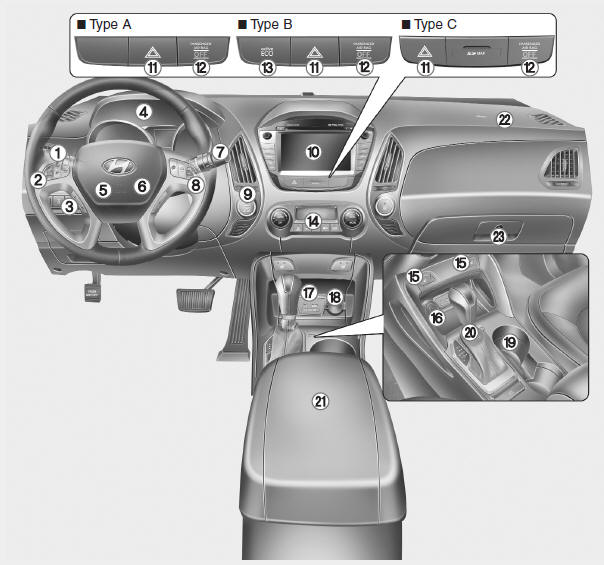
1. Light control/Turn signals
2. Steering wheel audio controls
3. Bluetooth phone controls
4. Instrument cluster
5. Horn
6. Driver’s front air bag
7. Wiper/Washer
8. Auto cruise controls
9. Ignition switch
10. Digital clock and Audio/AVN
11. Hazard warning flasher button
12. PASSENGER AIR BAG OFF indicator
13. Active ECO button
14. Climate control system
15. Seat warmer
16. Cigarette lighter
17. AUX, USB
18. Power outlet
19. Cup holder
20. Shift lever
21. Console box
22. Passenger’s front air bag
23. Glove box
 Interior overview
1. Door lock/unlock button
2. Power window switches
3. Central door lock switch
4. Power window lock switch
5. Outside rearview mirror control switch
6. Fuel filler door release lever
7. Instr ...
 Engine compartment
1. Engine coolant reservoir
2. Radiator cap
3. Brake fluid reservoir
4. Air cleaner
5. Engine oil dipstick
6. Engine oil filler cap
7. Windshield washer fluid reservoir
8. Fuse box
9. Batter ...
Other information:
Hyundai Tucson (LM) 2010-2015 Service Manual: Troubleshooting
Troubleshooting
SymptomPossible causeRemedyOne lamp does not light(all exterior)Bulb burned outReplace bulbSocket, wiring or ground faultyRepair if necessaryHead lamps do not lightBulb burned outReplace bulbIgnition fuse (LOW:10A, HIGH:20A) blownCheck for short and replace fuseHead lamp fuse (1 ...
Hyundai Tucson (LM) 2010-2015 Owners Manual: Blade replacement
Front windshield wiper blade
â– Type A
1. Raise the wiper arm and slightly rotate the wiper blade assembly to expose
the plastic locking clip.
CAUTION
Do not allow the wiper arm to fall against the windshield, since it may chip
or crack the windshield.
2. Press the clip (1) and slide ...
