
Hyundai Tucson: CD Player : AC111TMAN, AC110TMAN / Media mode
Pressing the  key will change the
operating mode in order of CD➟USB(iPod®)➟AUX➟My Music ➟ BT Audio.
key will change the
operating mode in order of CD➟USB(iPod®)➟AUX➟My Music ➟ BT Audio.
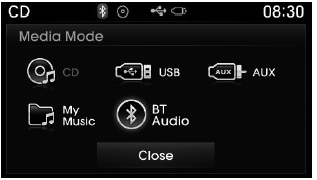
If [Mode Pop up] is turned on within

 [Display], then pressing the
 key will display the Media Pop-up
Mode screen.
key will display the Media Pop-up
Mode screen.
Turn the  TUNE knob to move the
focus. Press the knob to select.
TUNE knob to move the
focus. Press the knob to select.
✽ NOTICE
The media mode pop up screen can be displayed only when there are two or more media modes turned on.
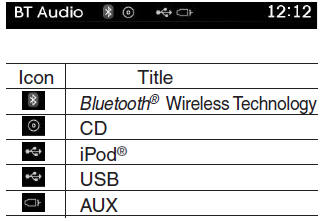
Title Icon
When a Bluetooth® Wireless Technology, iPod®, USB, or AUX device is connected or a CD is inserted, the corresponding mode icon will be displayed.
 Basic Mode Screen
1. Mode Display Displays currently operating mode.
2. Channel Information Displays the category, channel number, channel name, artist
and title information.
3. Preset Displays currently playin ...
 Audio CD Mode
...
Other information:
Hyundai Tucson (LM) 2010-2015 Owners Manual: Explanation of scheduled maintenance items
Engine oil and filter
The engine oil and filter should be changed at the intervals specified in the
maintenance schedule. If the car is being driven in severe conditions, more frequent
oil and filter changes are required.
Drive belts
Inspect all drive belts for evidence of cuts, cracks, exces ...
Hyundai Tucson (LM) 2010-2015 Owners Manual: Severe driving conditions
A - Repeatedly driving short distance of less than 5 miles (8 km) in normal temperature
or less than 10 miles (16 km) in freezing temperature
B - Extensive engine idling or low speed driving for long distances
C - Driving on rough, dusty, muddy, unpaved, graveled or salt-spread roads
D - Drivin ...
