
Hyundai Tucson: Engine Control System / Canister Close Valve (CCV) Repair procedures
| Inspection |
| 1. |
Turn the ignition switch OFF. |
| 2. |
Disconnect the CCV connector. |
| 3. |
Measure resistance between the CCV terminal 1 and 2. |
| 4. |
Check that the resistance is within the specification.
|
| 5. |
Disconnect the vapor hose connected with the canister from the CCV. |
| 6. |
Connect a vacuum pump to the nipple. |
| 7. |
Ground the CCV control line and apply battery voltage to the CCV power supply line. |
| 8. |
Apply vacuum and check the valve operation.
|
| Removal |
| 1. |
Turn the ignition switch OFF and disconnect the battery negative (-) cable. |
| 2. |
Lift the vehicle. |
| 3. |
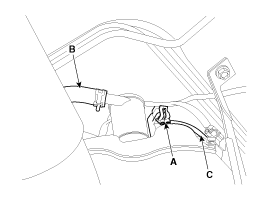
Disconnect the canister close valve connector (A). |
| 4. |
Disconnect the ventilation hose (B,C) from the fuel tank air filter and canister close valve.
|
| 5. |
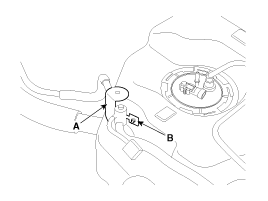
Remove the fuel tank air filter and canister close valve assembly (A) after removing the mounting nut (B).
|
| 6. |
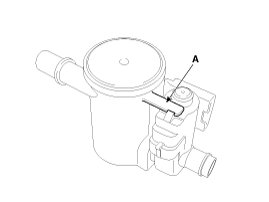
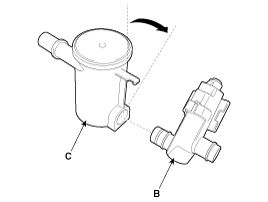
Release the lever (A), and then separate the canister close
valve (B) from the fuel tank air filter (C) after rotating it in the
direction of the arrow in the figure.
|
| Installation |
|

| 1. |
Install in the reverse order of removal.
|
 Canister Close Valve (CCV) Schematic Diagrams
Circuit Diagram
(M/T)
(A/T)
...

Other information:
Hyundai Tucson (LM) 2010-2015 Service Manual: Front Impact Sensor (FIS) Repair procedures
Removal
•
Removal of the airbag must be performed according to the precautions/ procedures described previously.
•
Before disconnecting the front impact sensor connector, disconnect the front airbag connector(s).
•
Do not turn the ignition switch ON and ...
Hyundai Tucson (LM) 2010-2015 Owners Manual: Rear window defroster
The defroster heats the window to help remove frost, fog and thin ice from the
rear window, while the engine is running.
To activate the rear window defroster, press the rear window defroster button
located in the center facia switch panel. The indicator on the rear window defroster
butto ...
