
Hyundai Tucson: Clutch System / Clutch Cover And Disc Repair procedures
Hyundai Tucson (LM) 2010-2015 Service Manual / Clutch System / Clutch System / Clutch Cover And Disc Repair procedures
| Removal |
| 1. |
Remove the transaxle assembly.
(Refer to "Manual transaxle system" in MT group) |
| 2. |
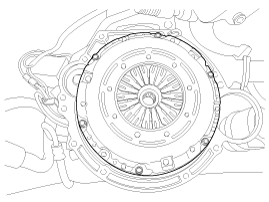
Remove the clutch cover bolts.
|

| Inspection |
| 1. |
Inspect cover diaphragm spring wear which is in contact with clutch release cylinder or consentric slave cylinder bearing. |
| 2. |
Check the clutch cover and disc surface for wear or cracks. |
| 3. |
Check the clutch disc lining for slipping or oil marks. |
| 4. |
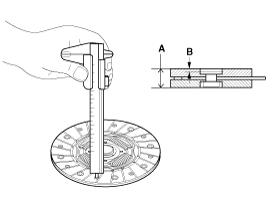
Measure the depth from a clutch lining surface to a rivet. If
the measured value is less than the specification below, replace it.
|
| Installation |
If reinstalling used cover, the cover should be installed with its clutch disc as a set.
|

| 1. |
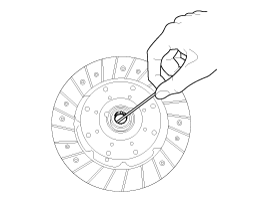
Apply grease on a disc spline part and transmission input shaft spline part as required.
|
| 2. |
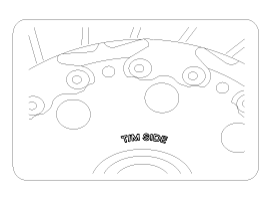
The 'T/M SIDE' marked surface should face the engineer.
|
| 3. |
Install the clutch disc and the cover with SST (A: 09411-1P000).
|
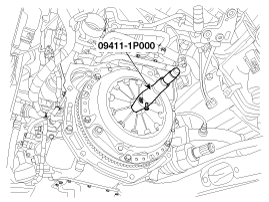
| 4. |
Install the clutch cover bolts. Not to be bent or twisted, Tighten them in diagonal directions.
|
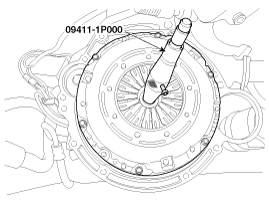
| 5. |
Install the transaxle assembly.
(Refer to "Manual transaxle system" in MT group.) |
 Clutch Cover And Disc Components and Components Location
Components
1. Clutch disc2. Clutch cover3. Manual transaxle 4. Engine flywheel5. Clutch release bearing6. Clutch release fork
...
 Clutch Pedal Components and Components Location
Components
1. Reverse hose2. Master cylinder3. Siller4. Member assembly5. Turn over spring6. Clutch switch7. Clutch arm8. Pedal pad9. Ignition lock switch10. Stopper
...
Other information:
Hyundai Tucson (LM) 2010-2015 Owners Manual: Hood
Opening the hood
1. Park the vehicle and set the parking brake.
2. Pull the release lever located under the lower left corner of the dashboard
to unlatch the hood. The hood should pop up slightly.
3. Raise the hood slightly, pull the secondary latch (1) inside of the hood center
until i ...
Hyundai Tucson (LM) 2010-2015 Service Manual: Line Pressure Control Solenoid Valve Specifications
Specifications
Direct control VFS[LINE Pressure]
x Control type : Normal high type
Control Pressure kpa (kgf/cmx, psi)500.14 ~ 9.81(5.1 ~ 0.1,72.54 ~ 1.42)Current value(mA)50 ~ 850 Internal resistance(x)5.1
...
© 2010-2026 www.htmanual.net
