
Hyundai Tucson: Rear Suspension System / Rear Stabilizer Bar Repair procedures
| Replacement |
| 1. |
Remove the rear wheel & tire.
|

| 2. |
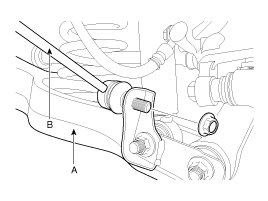
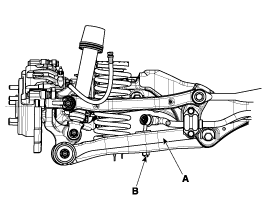
Loosen the nut and then remove the rear stabilizer link (B) with the rear lower arm (A).
[4WD]
[2WD]
|
| 3. |
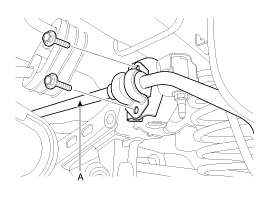
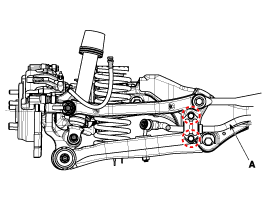
Loosen the mounting bolt and then remove the stabilizer bar (A) with the sub frame.
[4WD]
[2WD]
|
| 4. |
Installation is the reverse of removal. |
| Inspection |
| 1. |
Check the rear stabilizer bar for deformation. |
| 2. |
Check the rear stabilizer link ball joint for damage. |
 Rear Lower Arm Repair procedures
Replacement
1.
Remove the rear wheel & tire.
Tightening torque :
88.3 ~ 107.9N.m (9.0 ~ 11.0kgf.m, 65.1 ~ 79.6lb-ft)
Be careful not to damage to the hub bolts when ...
 Rear Assist Arm Repair procedures
Replacement
1.
Remove the rear wheel & tire.
Tightening torque :
88.3 ~ 107.9N.m (9.0 ~ 11.0kgf.m, 65.1 ~ 79.6lb-ft)
Be careful not to damage to the hub bolts whe ...
Other information:
Hyundai Tucson (LM) 2010-2015 Service Manual: Oil Pump Components and Components Location
Components
1. Reaction shaft support assembly2. Oil pump housing3. Driven gear4. Drive gear5. Oil seal6. Bushing-housing7. Reaction shaft8. Bushing-reaction shaft9. Sleeve10. Flange bolt
Oil Pump Operation Flow
1. Inhale (Oil filter)2. Inhale (Valve body)3. Outlet4. 26/B operation pressur ...
Hyundai Tucson (LM) 2010-2015 Owners Manual: Tilt steering/Telescope steering
Pull down the lock-release lever (1) on the steering wheel column and adjust
the steering wheel angle (2) and position (3, if equipped). Move the steering wheel,
so it points toward your chest, not toward your face. Make sure you can see the
instrument panel warning lights and gauges. Afte ...
