
Hyundai Tucson: SRSCM / Seat Belt Buckle Switch (BS) Repair procedures
| Removal |
| 1. |
Disconnect the battery negative cable, and wait for at least three minutes before beginning work. |
| 2. |
Remove the front seat assembly. (Refer to the Body group- Front seat) |
| 3. |
Loosen the seat belt buckle mounting bolt and remove the seat belt buckle switch.
|
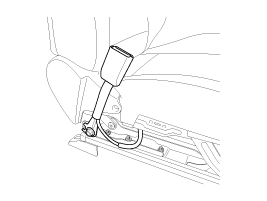
| Installation |
Be sure to install the harness wires not to be pinched or interfered with other parts. |

| 1. |
Remove the ignition key from the vehicle. |
| 2. |
Disconnect the battery negative cable, and wait for at least three minutes before beginning work. |
| 3. |
Install the seat belt buckle switch.
|
| 4. |
Install the front seat assembly. (Refer to the Body group - Front seat) |
| 5. |
Reconnect the battery negative cable. |
| 6. |
After installing the seat belt buckle switch, confirm proper system operation:
|

 Passive Occupant Detection System (PODS) Description and Operation
Description
The system is intended to classify the occupancy status of
the front passenger seat in a motor vehicle based upon the measured
force on the bottom seat cushion.
The system also com ...
Other information:
Hyundai Tucson (LM) 2010-2015 Service Manual: Description and Operation
Description
The immobilizer system will disable the vehicle unless the
proper ignition key is used, in addition to the currently available
anti-theft systems such as car alarms, the immobilizer system aims to
drastically reduce the rate of auto theft.
1.
Encrypted SMARTRA type immobilizer ...
Hyundai Tucson (LM) 2010-2015 Service Manual: Mode Control Actuator Repair procedures
Inspection
1.
Ignition "OFF�
2.
Disconnect the connector of mode control actuator.
3.
Verify that the mode control actuator operates to the defrost
mode when connecting 12V to the terminal 3and grounding terminal 4.
4.
Verify that the mode control actuator operates to the vent mo ...
