
Hyundai Tucson: Seat Belt Pretensioner / Anchor Pretensioner Repair procedures
| Removal |
| 1. |
Disconnect the battery negative cable, and wait for at least three minutes before beginning work. |
| 2. |
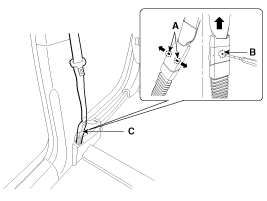
To remove the seat belt anchor pretensioner (C), keep on
pushing the lock pins (A) as arrow direction. And then remove the seat
belt after pushing the lock pin (B).
|
| 3. |
Remove the following parts. (Refer to the Body group-Interior trim)
|
| 4. |
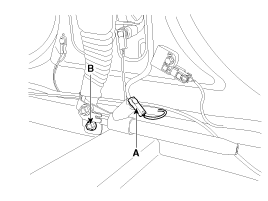
Disconnect the anchor pretensioner connector (A).
|
| 5. |
Loosen the anchor pretensioner mounting bolt (B) and remove the anchor pretensioner. |
| Installation |
| 1. |
Remove ignition key from the vehicle. |
| 2. |
Disconnect the negative (-) cable from battery and wait for at least three minutes. |
| 3. |
Install the anchor pretensioner with a bolt.
|
| 4. |
Connect the anchor pretensioner connector. |
| 5. |
Install the following parts. (Refer to the body group - Interior trim)
|
| 6. |
Insert the seat belt to the anchor pretensioner.
|

| 7. |
Reconnect the battery negative cable. |
| 8. |
After installing the anchor pretensioner, confirm proper system operation:
|
 Anchor Pretensioner Components and Components Location
Components
...
 Brake System
...
Other information:
Hyundai Tucson (LM) 2010-2015 Owners Manual: Using USB Mode
Playing/Pausing USB Files
Once a USB is connected, the mode will automatically start and begin playing
a USB file.
While playing, press the button
to pause and press button to play.
✽ NOTICE
Loading may require additional time if there are many files and folders
within the USB an ...
Hyundai Tucson (LM) 2010-2015 Service Manual: Passive Occupant Detection System (PODS) Repair procedures
Removal
1.
Disconnect the battery negative cable, and wait for at least three minutes before beginning work.
2.
Remove the front passenger seat assembly. (Refer to the Body group- Seat)
3.
Remove the seat cushion as an assembly. (Refer to the Body group- Seat)
Installation
1.
Inst ...
